Now that we have completed your onboarding call, I want to make sure you feel comfortable and prepared for our first session.
Seventh Remedy is a private, judgment-free space where you can focus fully on yourself. You do not need to perform, prove anything, or arrive already knowing what to do. We will work hard, but we will also work thoughtfully, choosing movements and progressions that support your body, your goals, and your current starting point.
Here, you will find some of the information we discussed so you do not have to remember every detail. You can return to this page anytime during your program when you need a refresher.
After your first couple of sessions, you will receive access to your personal portal. Your portal will be the main place to find exercises, resources, progress updates, and materials created specifically for you.
A good Zoom setup allows me to see how your entire body is moving while also making it easy for you to see and hear my demonstrations.
A laptop or tablet usually provides the best experience because the larger screen makes it easier to see exercise demonstrations, positioning, and corrections. A phone will also work, but it should be secured in a stand or placed on a stable surface where it will not slide, tip, or need to be held during the session.
Your phone, tablet, or laptop will still need to remain positioned where its camera can see your full exercise area. If you are using two screens, place the larger screen where you can comfortably watch demonstrations without repeatedly turning your head or body away from the camera.
Please test your setup before your first session, including the camera angle, sound, screen connection, and internet connection. Keep the microphone and speakers active on only one device to prevent echo or feedback. If you are using your phone or tablet as the camera while viewing the session on a television, mute the television or the smaller device so that the sound comes from only one place.
Please try to join approximately three to five minutes early during your first few sessions. This gives us time to check your camera, lighting, sound, and equipment without taking time away from your workout.
Once you have used the same setup a few times, getting ready should become much quicker.
Before joining:
Step 1: Click your private Zoom link
The link will be provided before your session.
Step 2: Open the meeting in Zoom
Download the app or join through your browser.
> If the Zoom Workplace app is already installed, your device may ask whether you would like to open the link in Zoom. Select Open Zoom.
> If the app is not installed, you may be prompted to download it or given the option to join through your browser.
I recommend using the Zoom Workplace app whenever possible because it generally provides the most reliable video, audio, and meeting controls.
Step 3: Allow access to your camera and microphone
When prompted, select Allow so I can see and hear you during your session.
Technology is not always predictable. If our connection is lost during a session, we will both attempt to rejoin using the same Zoom link.
If we are unable to reconnect and less than half of the scheduled session has been completed, I will provide a complimentary make-up session, regardless of whose internet connection or device caused the interruption.
If more than half of the session has been completed, I will make sure you have clear instructions for anything we were unable to finish.
Before your first session, you can visit Zoom’s test meeting page at zoom.us/test to check your camera, microphone, speakers, and internet connection. Zoom also allows computer users to select Test Speaker and Microphone before entering a meeting.
When joining from a phone or tablet, choose Wi-Fi or Cellular Data when Zoom asks how you would like to connect your audio.
During a private training session, you can usually remain unmuted. This allows me to hear your questions, breathing, and feedback while you are exercising. We can mute your microphone temporarily if there is distracting background noise.
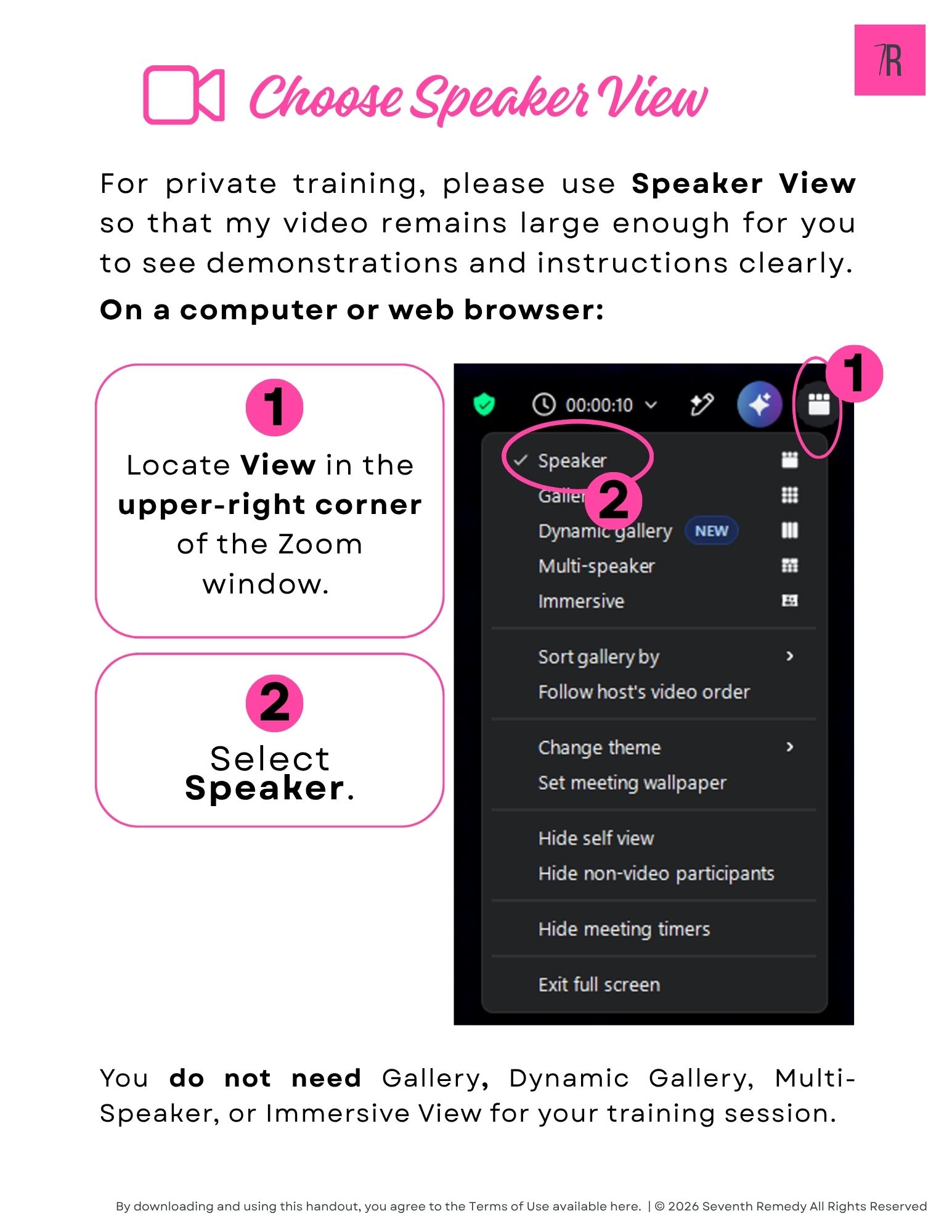
For private training, please use Speaker View so that my video remains large enough for you to see demonstrations and instructions clearly.
On a computer or web browser
You do not need Dynamic Gallery, Multi-Speaker, or Immersive View for your training session.
On a phone or tablet
Zoom normally opens in Active Speaker View automatically. You can remain in this view during the session.
Keep your Self View visible while we check your camera position. Once your setup is confirmed, you may select Hide Self View if seeing yourself on the screen feels distracting. This only removes your image from your own screen. I will still be able to see you.
As outlined in your agreement, training sessions may be recorded. Zoom will notify you when recording begins. Please let me know at any time if you would like me to pause the recording.
When possible, place your camera around hip or waist height. This usually gives me a clearer view of your posture, joints, and overall movement than placing it very low or high above you.
Set the camera far enough away that I can see as much of your exercise area as possible, including:
Your setup does not need to be perfect. We will work with the space and equipment you have and make adjustments together. In some rooms, you may need to move the camera or device between standing and floor exercises, and that is completely fine.
Keep the camera stable and pointed toward your exercise area. A tripod, tablet stand, phone stand, shelf, or sturdy stack of books can all work well.
For a phone or tablet, we will decide whether landscape or portrait orientation works best in your room. Landscape often allows more room for side-to-side movement, while portrait may make it easier to fit your full standing body into a smaller space.
Camera Angle for Standing Exercises
For standing exercises, keep the camera around hip or waist height and point it straight toward your exercise area.
Before we begin, check that your head and feet are both visible. You should also remain visible when you raise your arms overhead or take a step to either side.
I may occasionally ask you to turn sideways or face a different direction so that I can see a movement from another angle.
Camera Angle for Floor Exercises
For floor exercises, tilt the camera slightly downward so I can see as much of your mat and body as your space allows.
When there is enough room, placing the mat at a slight diagonal to the camera may make it easier to keep your head, torso, hips, and feet in view. In a smaller space, you may need to move the device a little farther back, lower the angle, or adjust the mat between exercises.
Your setup does not need to fit your entire body perfectly from one position. We will practice this during onboarding and find the arrangement that works best in your room before your regular sessions begin.
Position yourself so that a lamp, window, or other light source is in front of you or slightly to one side.
Avoid placing your primary light source directly behind you. A bright window or lamp behind your body can make it difficult for me to see your posture and movement.
You do not need professional lighting. I just need enough light to see your entire body clearly.
A clear area of approximately 6 by 8 feet works well for most sessions, although we can adjust exercises when you have less room.
You should have enough space to:
Remove cords, rugs that slide, pets’ toys, and other objects that could become a tripping hazard.
Keep any equipment you will use nearby but outside the area where you will be stepping.
If you are using a chair, place it slightly behind you or to one side so that it is easy to reach when needed. Choose a sturdy chair without wheels whenever possible. When the chair is being used for balance or support, placing it against a wall can help prevent it from sliding.
Keep your weights, bands, ball, sliders, water, and any other equipment for the session together at the side of your exercise area. This will help us move smoothly between exercises without having to search for anything.
How to Display a Zoom Session on Your TV Using a Fire TV Stick
How to Mirror Your iPhone or iPad to a TV
Apple AirPlay and Roku
Apple AirPlay is available on many compatible Roku streaming devices and Roku TVs running Roku OS 9.4 or later. Because compatibility varies by model, please check Roku’s official AirPlay compatibility guide before beginning.
Requirements and Setup
Connect to the same Wi-Fi network
Make sure your iPhone or iPad and your Roku device are connected to the same wireless network.
Turn on AirPlay on your Roku
Continue with the screen-mirroring instructions.
If the Apple AirPlay and HomeKit option does not appear in your Roku settings, the device may not support AirPlay, may need a software update, or may be an incompatible model.
Wear comfortable clothing that allows you to move freely and lets me see your general body positioning during exercises. Your clothing does not need to be tight or revealing, but very loose or oversized clothing can sometimes make it difficult for me to see your alignment and coach you accurately.
Depending on the exercise and your comfort, you may train barefoot, in regular socks, grip socks, or supportive athletic shoes. We can decide what works best based on your flooring, balance, comfort, and the movements we are doing.
You do not need a fully equipped home gym to begin. Your program will be designed around the equipment you already have, your available space, and what is appropriate for your needs.
Needed to Begin
Equipment We May Add
Depending on your program, we may gradually introduce:
Additional Equipment
Items such as foot wedges, sliders, a stability ball, or a suspension trainer are completely optional and are not required for your training.
If there is something you would like to try, or you are interested in adding equipment as your program progresses, you are always welcome to ask. I can help you decide whether it would be useful and choose an option that fits your needs, space, and budget.
Have water nearby and begin your session as normally hydrated as possible. Try not to wait until the workout begins to start drinking fluids.
You do not need to eat a full meal immediately before training. Some people feel best after a light meal or snack, while others prefer more time between eating and exercise. Choose an option that feels comfortable and follows any guidance you have received from your healthcare provider or dietitian.
Please let me know before we begin if nausea, vomiting, diarrhea, constipation, low appetite, dizziness, unusual fatigue, or difficulty eating or drinking may affect your ability to exercise that day. We can adjust the session when appropriate, but some symptoms may mean that training should be postponed.
You do not need to know how to perform every exercise before you begin. My job is to teach you, guide you, and adjust the plan as needed.
Your sessions will take place live through Zoom and will include a warm-up, strength and movement exercises, and a cooldown. I will demonstrate each exercise, coach your positioning and technique, and provide modifications or progressions based on what I see.
Your program may include strength training, Pilates-based movement, balance, mobility, core training, corrective exercise, and movements that support everyday activities. Some people benefit from repeating exercises consistently, while others prefer more variety. Your sessions will reflect what helps you learn, stay engaged, and progress toward your goals.
During the first few sessions, I will learn how you move, how your body responds, and which instructions and progressions work best for you.
Once we have had time to work together, I may recommend exercise between sessions if it would support your progress. Any assignment will be discussed with you first and based on your goals, needs, schedule, and interest.
Your training will be designed around your goals, current abilities, health history, and how your body feels throughout the program.
You can expect thoughtful programming, clear instruction, and exercises selected specifically for you. I will pay attention to your movement, breathing, comfort, energy, and progress rather than focusing only on more repetitions or heavier weights.
I will explain why we are doing certain exercises, make adjustments when something does not feel right, and help you find an appropriate level of challenge without making you feel rushed or pressured.
Please arrive on time with your equipment nearby, when applicable, and enough space to move comfortably. Wear clothing that allows you to move freely. We will usually train barefoot, but I may recommend supportive shoes when they provide greater comfort, stability, or safety.
Tell me when something feels painful, unusual, or different from what you normally experience. I also need to know about new injuries, falls, illnesses, medication changes, or symptoms that may affect your ability to exercise safely.
Some muscle fatigue, mild burning, or stretching can be a normal part of exercise. Sharp pain, pinching, catching, joint pain, numbness, tingling, dizziness, or pain that worsens as you continue is different. Stop and tell me immediately if you experience anything concerning or unfamiliar.
You are never expected to push through pain or hide when something does not feel right. Honest communication helps me coach you more effectively.
Progress can be measured in several ways, including improvements in strength, balance, stability, mobility, coordination, posture, exercise technique, and your ability to perform everyday activities.
We may also track changes such as:
I will email you a private link to your personal portal. This is where you will find your personalized toolkit, including exercise between sessions, educational resources, progress updates, and other materials created for you. When something new is added, I will email you and let you know what to look for.
Your toolkit will continue to grow as we work together, giving you one place to find the information created specifically for you.
When exercise is assigned between sessions, it may include several movements based on what would best support your progress.
These sessions are meant to reinforce skills we are building together, such as movement control, balance, mobility, breathing, or muscle activation. They are not intended to make every day a workout day. Rest and recovery are an important part of becoming stronger, so I will consider your full training schedule before adding anything between sessions.
Your body benefits from practicing movements with control and good form. Completing fewer thoughtful repetitions is more valuable than rushing through an entire assignment just to finish it.
You are welcome to record yourself performing an exercise and send it to me if you would like feedback on your form. This is completely optional.
I may occasionally ask for a brief recording if you are having difficulty with an exercise or have reported discomfort. I will never ask you to repeat a movement that causes pain. Seeing your setup or a comfortable version of the exercise may help me understand what is happening and decide how to adjust it.
Stop any exercise that causes pain and let me know by text or email before trying it again.
You are welcome to contact me between sessions by email at claudia@seventhremedy.com or by text at (716) 480-3523 with questions about your exercises, equipment, symptoms, or exercise between sessions. I will respond within 24 business hours.
I am always happy to help you think through a training concern, but I cannot diagnose an injury or provide medical treatment. New, severe, worsening, or concerning symptoms should be discussed with your healthcare provider.
I understand that illness, work demands, family responsibilities, and unexpected situations can affect your schedule. Please give as much notice as possible when you need to cancel or reschedule a session.
You can review the complete cancellation and rescheduling policy here.
What to Do if Something Changes
Please contact me before your next session if you experience a change that may affect your ability to exercise safely, including:
Please share what happened, how you are feeling now, and whether you have received medical guidance. You do not need to provide details that are unrelated to training.
Depending on the situation, I may modify the session, postpone training, or ask you to obtain medical guidance before continuing. Please tell me before the session begins whenever possible.
During a session, stop immediately and tell me if you experience sharp pain, pinching, catching, joint pain, numbness, tingling, dizziness, chest pain, unusual shortness of breath, or another concerning or unfamiliar symptom.
I cannot diagnose an injury or determine whether a new symptom is medically safe. New, severe, worsening, or concerning symptoms should be discussed with an appropriate healthcare provider.
Your training is based on the health information you provide and is not a substitute for medical evaluation, diagnosis, or treatment. Please keep relevant health information current and follow the recommendations of your healthcare providers.
Exercise involves inherent risks. Stop exercising and seek appropriate medical help if you experience a medical emergency or severe or concerning symptoms.
I will provide another version or choose a different exercise. You are not expected to force a movement that causes pain or does not feel appropriate for you.
Tell me at any time. We can pause, rest, change positions, reduce the intensity, or end the session when necessary.
Text or email me as soon as possible. We will try a few basic troubleshooting steps and determine whether the session can continue.
Mild muscle soreness can occur, especially when an exercise, resistance level, or movement pattern is new. Some people notice soreness the next day, while others may feel it more strongly 24 to 48 hours later. You may also complete a challenging and effective workout without feeling sore at all.
When we train two or three times per week, I plan each session with your recovery in mind. The exercises, resistance, pace, and session length may be adjusted based on how recently you trained, how your body responded, and how much recovery time you have before our next session. A session followed by more recovery time may be slightly more demanding, while sessions closer together may have a different focus or intensity.
Please let me know how your body feels between sessions so I can make thoughtful adjustments. Contact me if soreness is severe, interferes with normal movement, continues to worsen, or feels more like joint pain or an injury.
Please let me know before your next session if a medication or dose change affects your energy, balance, appetite, hydration, digestion, or ability to exercise safely.
Share a bit about where you are so I can meet you there with the right kind of training support.
Thank you for taking the time to complete this form. I appreciate your feedback and the trust you placed in Seventh Remedy.
Your words help me continue improving my services and may help another woman feel more comfortable taking the next step.
Here’s to feeling your best,
Claudia
Understand Your Heart Rate Zones
Estimate your heart rate zones and learn what each effort level should actually feel like.
Heart rate zones can help you understand how hard your body is working during cardio, walking, strength circuits, or conditioning. But heart rate is only one way to measure intensity. Your heart rate can be affected by sleep, stress, hydration, medication, caffeine, fitness level, and even the temperature in the room.
This calculator gives you an estimate that you can compare with your breathing, talk test, and rate of perceived exertion (RPE) so you can understand effort in a more practical way.
Use heart rate as a guide. If your smartwatch or fitness device says one thing but your body says something else, pay attention.
Check in with yourself and ask:
Age (years)
These numbers are estimates. Use them with your breathing, talk test, and RPE. Heart rate can change with stress, sleep, hydration, caffeine, medication, temperature, and fitness level.
Your body uses both fat and glucose for energy all day long. It is never only burning one type of fuel. At lower intensities, your body can rely more on oxygen and fat because the pace is steady. As effort gets harder, your body leans more on glucose because it needs energy faster. One zone is not better than another. They simply train different systems depending on your goals.
This tool is for education only. It does not diagnose, prescribe exercise intensity, or replace guidance from your medical team. If you take medication that affects heart rate or have cardiovascular concerns, ask your medical provider what intensity range is appropriate for you.
(Find out in less than 1 minute!)
Answer a few quick questions about how your body feels and how you like to exercise. This will help you see if The Remedy Method, which blends corrective exercise, Pilates-style control, and strength training for women on GLP-1 medications, is a good fit for you.
A quick check-in on your last meal and today’s patterns so you can see what your body might be asking for next.
Use this tool to look at your Body Mass Index (BMI) and waist size.
BMI compares your height and weight to estimate general body size. It does not measure fat or muscle and cannot show how your body is changing with strength training or GLP-1 use. It is simply a numerical estimate.
Waist size provides additional information because abdominal fat is more closely linked to metabolic risk than fat stored in other areas. Measuring the waist gives a better idea of where the body is holding weight.
Both BMI and waist size can change quickly when someone starts a GLP-1. Muscle, water, and fat often shift at different rates, so these numbers work best as general reference points rather than something to obsess over.
This tool gives you a simple snapshot you can use for your own self-awareness or just to know before doctor’s appointments. It’s one of several things to pay attention to, along with movement quality, strength levels, recovery, and daily well-being.
Waist size is optional. The tool will still calculate your BMI if you skip that section.
BMI Categories:
Unit of measure
Sex
Age (years)
Height (feet)
Height (inches)
Weight (pounds)
Waist circumference (inches, optional)
Height (cm)
Weight (kg)
Waist circumference (cm, optional)
Please keep in mind that these numbers simply give you a general snapshot. They do not measure muscle, fitness level, or how your body is changing with strength training or GLP-1 use. They are just reference points you can pair with how you feel, how you move, and what you discuss with your medical team.
This tool is for education only. It cannot diagnose medical conditions. If you have new symptoms or health concerns, talk with your medical team for guidance. For adults only. BMI is one data point and does not reflect muscle, body composition changes on GLP-1s, or overall health.
(Find out in less than 1 minute!)
Answer these questions about how your body feels today. This tool helps you find a safe starting point for key movement patterns if you are using GLP-1 medications or coming back to exercise after weight loss. The goal is to match your body to the right level of support, not to push through pain or fear.
1. How do your knees feel when you walk, use stairs, or stand up from a chair?
2. How does your low back feel today?
3. How steady do you feel on your feet?
4. Can you safely get down to the floor and back up on your own?
5. Any foot or ankle pain when you walk or stand?
6. Right now, how confident do you feel about moving your body?
This tool is for education only. It cannot diagnose injuries. If you have strong pain, falls, or new symptoms, talk with your health care team before starting or changing your exercise plan.
Many women notice changes in balance, coordination, and strength as they lose weight. This tool helps you choose movements that feel supportive instead of stressful, so you can build confidence and avoid overloading joints or overworking muscles that are still adjusting.
1. Have you eaten a small meal or snack in the last 2 to 3 hours?
2. How is your stomach right now?
3. How is your energy right now on a scale from 1 to 10?
4. Have you felt dizzy, faint, or lightheaded when you stand up today?
5. Any new sharp pain, chest tightness, or trouble breathing since your last workout?
This tool is for education only and does not replace medical advice. If you ever feel unsure, choose rest and contact your health care team.
First, calculate your daily protein target using the protein calculator.
Then enter your maintenance calories from the TDEE calculator, or type in a starting estimate, and choose your goal. This calculator adjusts your calories based on that goal and shows you how those calories break down into protein, fats, and carbohydrates. This is called a macro split.
For women using GLP-1 medications or going through weight loss, this structure is designed to make eating feel more manageable. Protein supports muscle. Fats support hormones and nutrient absorption. Carbohydrates support energy, movement, and recovery.
Protein recommendations online can be confusing because the official Recommended Dietary Allowance (RDA) is designed to prevent deficiency, not necessarily support muscle retention during weight loss. The RDA for protein is 0.8 grams per kilogram of body weight, but many experts recommend closer to 1.2–1.6 g/kg during weight loss or resistance training. That is why our Daily Protein Target Calculator starts at 1.2 g/kg.
Fat intake is usually recommended as a percentage of total calories rather than a fixed number. For most adults, about 20% to 35% of daily calories coming from fat is considered a balanced range. This calculator keeps fats within a moderate range while balancing protein and carbohydrates based on your calorie needs and goal.
Carbohydrates help support energy, movement, recovery, and brain function. General nutrition guidelines often place carbohydrate intake within a broad range depending on activity level and calorie needs. Instead of using a rigid percentage, this calculator adjusts carbohydrates based on your calorie intake, protein target, and fat needs while maintaining a minimum intake for daily function and energy levels. However, carbohydrate needs can still vary widely depending on activity level, appetite, medications, and overall calorie intake.
Your protein target comes directly from the protein calculator. This tool builds the rest of your intake around that number.
Please note: If you choose Body Recomposition (losing fat and building muscle), the calculator uses a smaller calorie reduction than the Fat loss setting. This provides more energy for strength training and recovery while still creating a modest starting deficit. Building muscle while losing fat is possible, but results will depend on your resistance training, protein intake, recovery, starting point, and actual calorie intake. The calculator provides a starting structure rather than guaranteeing that both changes will happen at the same rate.
Use your TDEE number from the TDEE calculator or enter a starting maintenance estimate.
This calculator will adjust that number based on your goal before splitting your macros.
Use my TDEE Calculation
Adjusted calories: 0 kcal per day
Protein: 0 g per day
Fat: 0 g per day
Carbs: 0 g per day
This is a starting point, not a prescription. Your medical team may adjust your needs based on your health, labs, and medication plan.
Enter your weight and choose how often you strength train. This calculator gives you a daily protein range in grams to help support muscle, recovery, and overall health.
The Recommended Dietary Allowance (RDA) for protein is 0.8 grams per kilogram of body weight. That amount is the minimum needed for basic health, not for maintaining muscle during weight loss or training.
People may need more than the RDA when they are:
This calculator starts at 1.2 grams per kilogram. Think of this as your baseline for muscle protection, not a goal you have to exceed. The range increases slightly based on how often you train. This reflects what your body could use if it is supported with enough food and recovery.
Because appetite can be lower on GLP-1 medications, you do not need to chase the highest number in the range. Start with the lower end of your range and focus on consistency first. If your appetite allows and your body is responding well, you can gradually work toward the higher end. If not, staying at the lower end is still effective for protecting muscle.
Recommended range:
0 to 0 grams per day
This range is an estimate based on body weight and strength training level. It is a guide, not a strict rule. Your medical team may adjust your protein needs, especially while you are on GLP-1 medication.
Fill in your details to find your Total Daily Energy Expenditure (TDEE) and Basal Metabolic Rate (BMR).
Your TDEE is the total amount of energy your body uses in a full day. This includes everything. Your workouts, walking, cleaning, daily movement, shifting posture, fidgeting, and even the energy it takes to digest your food.
Part of your TDEE is your BMR. Your BMR is the energy your body needs for basic life functions like breathing, circulating blood, maintaining organs, and keeping your body temperature stable. This is what your body would use even if you stayed in bed all day.
Understanding both numbers is helpful if you are on a GLP-1 or working on your health. Appetite can drop quickly, which makes it easy to undereat without noticing. Knowing your TDEE and BMR shows you how much fuel your body actually needs so you can keep your energy up, protect muscle, and support safe and steady fat loss.
You can choose from three formulas to calculate these numbers. Mifflin-St. Jeor and Harris-Benedict use height, weight, age, and sex. Katch-McArdle uses body fat percentage if you know it. They use slightly different math equations, but they all estimate the same thing. Mifflin-St. Jeor is generally the most accurate for most people.
BMR: 0 kcal per day
TDEE: 0 kcal per day
These are estimates. Calculators may read low for people with more muscle and may not work well for people living with obesity. Use as a guide, not an exact number.
Form-focused. Emotionally aware. Personalized support from the comfort of your home.
Private, 1:1 via Zoom
• Best Value • One-Time Payment | • Includes 30-day satisfaction guarantee
Three automatic installments
• Best Value • One-Time Payment | • Includes 30-day satisfaction guarantee
Three automatic installments